I made Gug's Puzzle Adventure in 2002 with the help of a few friends. It's a short, playable demo, which you can play from your GBA software emulator or flash cart. Please e-mail me with comments and questions.
NOTE: this page has not been substantially updated since 2002.
Table of Contents
-----------------
---------------------------------
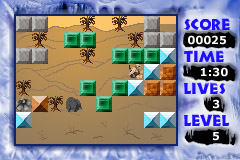
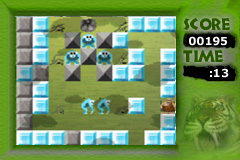
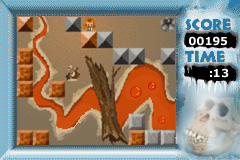
2. Screen shots
---------------------------------
 |
 |
 |
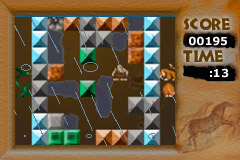
|
top
---------------------------------
3. How to launch and play the game
---------------------------------
|
Launching the game First, download the ROM. If you have a way to test on hardware, please use it! Otherwise, use an emulator. Visual Boy will give you all effects except for sound (Ctrl-O will load and run the ROM). Boycott Advance will give you sound, but doesn't support windowing, so menus are obscured by sprites (Ctrl-O will load and run the ROM). Take your pick. Once you run the ROM, hit start (enter) at the splash screen. NOTE: this game was tested on hardware using the Visoly Flash Advance Linker from Lik-Sang.com. The emulators are pretty good, but hardware's the best way to play it. |
|
Playing the game Controls:
A (Z in emulator): Swap
Select a game type from the menu. If you have not played before, I recommend tutorial. It's a quick way
to see some of the environments (rain and clouds are in levels two and three), and it
will give you an idea of the basic rules, which are: Story Mode: The levels are specially designed to challenge you. Some have time limits. If a monster eats you or you run out of time, you restart the level. If you can't beat a level, you can go to "skip" in the menu if you want to see another of the three levels. Arcade Mode: The clock is counting down, and if you run out of time you lose! If a monster hits you, he takes away half your time. Blocks continually come into existence, and when you glom enough, you go to the next level.Currently, if you "lose", it takes you to the next level so you can see all three levels. Also, if you glom more than four blocks together at once, you get a superstrength powerup! It lets you move immovable blocks, or push two blocks at a time. |
---------------
4. Known issues
---------------
- save and load functionality has been removed.
- super-secret powerup in story mode doesn't do anything (it will bring you to a secret level in the next version).
- occasional bug starting level three in story mode-- says game over, but you didn't lose!
-----------------------------------------
5. Information about the development team
-----------------------------------------
Matthew Franklin
matt@independentcreator.com
Other programmers:
Craig Olrich
Gordon McNaughton
Lead Artist (only artist!):
Ruth Williams
ruth@animalocean.com
Ruth made every last piece of art for Gug's Puzzle Adventure.
top